
WPForms vs Ninja Forms (2026): Which Free WordPress Form Plugin Wins?
WPForms and Ninja Forms are both free, both widely installed, and both hit the same wall the moment a form needs to do anything past collect a name and a message. If you're choosing between them, the real question isn't "which free plan is better" — it's which paid tier gets you what you need without wasting money on sites you don't have.
The short answer: WPForms and Ninja Forms are nearly identical on the free tier — both genuinely limited to a basic contact form, no conditional logic, payments, or multi-step forms on either. Where they diverge is paid pricing: Ninja Forms gives more site licenses per dollar at every comparable tier, while WPForms has the larger template library and an easier first-time builder experience.
Quick verdict
Neither plugin's free tier does more than a basic contact form. The decision mostly comes down to how many sites you need and whether you'd rather pay more for WPForms' polish or less for Ninja Forms' plainer builder.
What is WPForms
WPForms, built by Awesome Motive (also behind OptinMonster and MonsterInsights), leans on a large pre-built template library (1,900+ across the WPForms ecosystem) and heavy documentation aimed at non-technical site owners rather than pushing features into its free tier.
WPForms Lite, the free WordPress.org version, is intentionally minimal: a basic contact form builder with a handful of field types and no conditional logic, payments, or file uploads. Everything past that requires a paid license, split across four tiers by both feature access and site count.
WPForms pricing (annual, per published pricing page):
| Tier | Sites | Price/year |
|---|---|---|
| Lite | 1 | $0 |
| Basic | 1 | $99 |
| Plus | 3 | $199 |
| Pro | 5 | $399 |
| Elite | Unlimited | $599 |
What is Ninja Forms
Ninja Forms takes a different shape: a genuinely free "Core" plugin with no time limit and no site-count restriction, plus a set of official paid add-ons — conditional logic, payment gateways, multi-part forms — bundled into its paid tiers rather than sold individually.
Ninja Forms pricing (annual, per published pricing page):
| Tier | Sites | Price/year |
|---|---|---|
| Core | Unlimited | $0 |
| Plus | 3 | $99 |
| Pro | 20 | $199 |
| Elite | Unlimited | $499 |
Free plan: what you actually get
Both free plans hit the same practical ceiling — a working contact form with standard fields and email notifications, nothing more. Neither includes conditional logic, payment fields, multi-step forms, or meaningful file uploads.
The difference is in the fine print: WPForms Lite is free but explicitly a one-site, entry-level product Awesome Motive positions as a lead-in to paid plans. Ninja Forms Core has no such site-count ceiling — install it on as many sites as you want, indefinitely, at $0, for as long as a basic contact form is all you need.
Ease of use and templates
WPForms wins clearly here. Its builder does less by design — fewer options per field, a more linear flow — which makes it the easier starting point for someone building their first WordPress form ever. Its template library (1,900+ across the ecosystem) is also substantially larger than Ninja Forms', letting you start from something close to what you need instead of a blank canvas.
Ninja Forms' builder is capable but plainer, with fewer pre-built templates to start from. For a developer or anyone building forms regularly, this gap barely matters — both interfaces are learnable in under an hour. For a one-time, first-ever form, WPForms' extra polish has real value.
Conditional logic
Both gate this behind a paid tier, and both cover the same basic show/hide-on-condition functionality at the field level once you're paying. WPForms requires Plus ($199/year, 3 sites); Ninja Forms requires Plus ($99/year, 3 sites) — same site count, half the price, for functionally similar rule depth.
Payment integrations
Neither free plan includes payments — one of the few points where the two are identical. On paid tiers, WPForms supports Stripe, PayPal, Square, and Authorize.Net; Ninja Forms supports Stripe and PayPal through paid add-ons, a narrower gateway list than WPForms offers at the same price point.
Multi-step forms
WPForms sells multi-step as "Form Pages," Pro-tier only, with no multi-step capability on Lite at all. Ninja Forms' Multi-Part Forms add-on is available from Plus — meaning Ninja Forms reaches multi-step functionality at a lower price ($99/year) than WPForms does ($399/year, since Form Pages requires the Pro tier).
Entry management
WPForms Lite gives you almost nothing here — entries aren't stored in a browsable list until you upgrade; you're relying on the email notification arriving and staying in your inbox. Ninja Forms Core does store entries with basic viewing, though deeper filtering and CSV export are Plus-tier features.
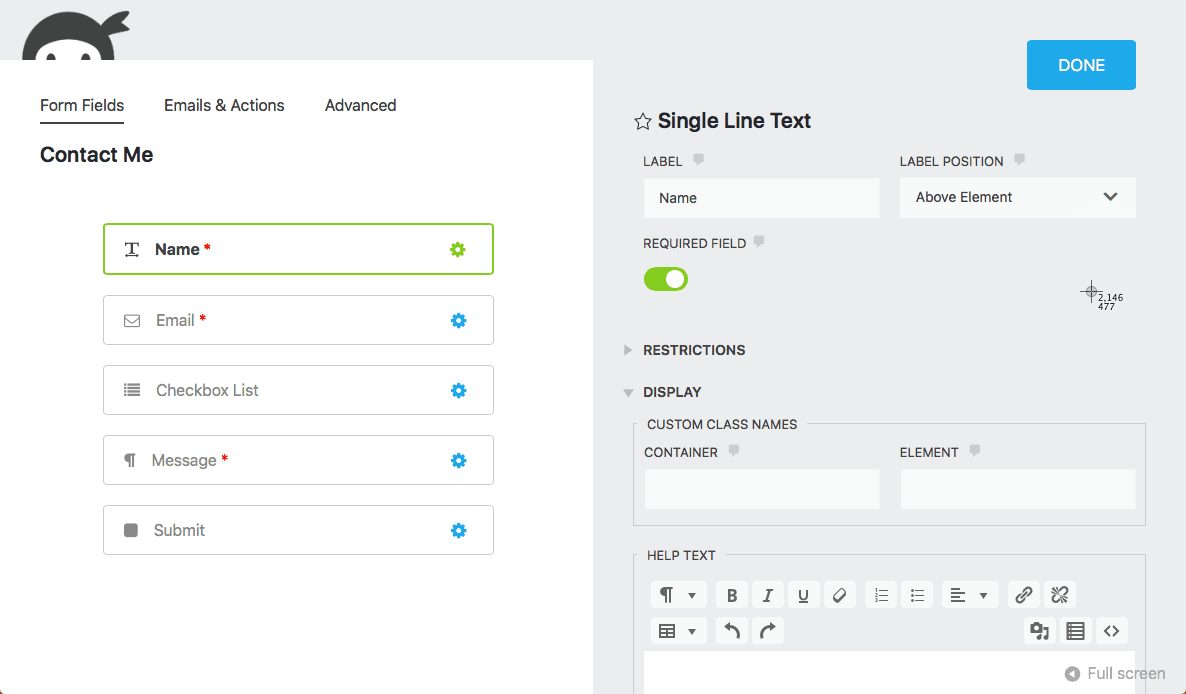
If losing track of a submission because an email got buried is a real concern, Ninja Forms Core's free entry storage is a meaningful practical edge over WPForms Lite.
Pricing side by side
At every comparable price point, Ninja Forms includes more site licenses — $99/year gets 1 WPForms site or 3 Ninja Forms sites; $199/year gets 3 WPForms sites or 20 Ninja Forms sites. WPForms only closes the gap in what each price actually buys you in polish and template selection, not in raw site-per-dollar value.
Pros and cons
WPForms
- Easiest builder for absolute beginners
- Largest template library in the category (1,900+)
- Most mature documentation and support ecosystem
- Free Lite plan tied to 1 site, with no growth room before paying
- More expensive at every comparable paid tier
- No usable multi-step support until the Pro tier ($399/yr)
Ninja Forms
- Genuinely free Core plugin with no site-count limit
- More site licenses per dollar at every paid tier
- Multi-step forms reachable at a lower tier ($99/yr) than WPForms ($399/yr)
- Plainer builder and smaller template library
- Smaller documentation and support ecosystem than WPForms
- Narrower payment gateway selection on paid tiers
Who should choose WPForms
Pick WPForms if you're building your first WordPress form ever and want the gentlest possible learning curve, or if you want to start from a large pre-built template library instead of a blank canvas. It's also a reasonable pick for agencies standardizing on one plugin across client sites who value its more mature support infrastructure.
Who should choose Ninja Forms
Pick Ninja Forms if you're running (or plan to run) the plugin across several sites and want more licenses per dollar, or if you specifically need multi-step forms without paying for WPForms' Pro tier. It's also the stronger pick if free, unlimited-site installs matter more to you than template variety.
A quick decision checklist
- You've never built a WordPress form before and want the easiest ramp-up → WPForms.
- You need conditional logic on more than 1-2 sites → Ninja Forms Plus ($99/yr, 3 sites) beats WPForms Plus ($199/yr, 3 sites) at the same site count.
- You need multi-step forms and don't want to pay $399/yr → Ninja Forms, reachable from Plus.
- You want the largest template library and don't mind paying more → WPForms.
- You want conditional logic and payments without paying for a plugin at all → Neither. See the alternative below.
A third option worth knowing about
If what stalled this comparison for you was realizing neither free plan includes conditional logic or payments, that's specific to WPForms and Ninja Forms, not universal. ChargeForms includes conditional logic, Stripe and PayPal payments (including subscriptions, $0 platform fee), multi-step forms, file uploads, and full entry management on its free plan, with unlimited sites and no license required to unlock any of it.
For the direct breakdowns: ChargeForms vs. WPForms and ChargeForms vs. Ninja Forms, or see how these two stack up against a third competitor in Gravity Forms vs. Ninja Forms.
The bottom line
WPForms and Ninja Forms are both reliable, both genuinely free at the entry level, and both hit the exact same wall once a form needs conditional logic, payments, or multiple steps. If ease of use and template variety matter most, WPForms is worth the premium. If you're running more than one or two sites, Ninja Forms consistently gets you further per dollar once you're paying either way.
And if the honest answer is "I don't want to pay for conditional logic or payments at all," that's the gap neither of these two plugins closes — which is the specific problem ChargeForms' free plan was built to solve.
Frequently asked questions
Is WPForms or Ninja Forms better?
They're closely matched on the free tier — both are genuinely limited to a basic contact form with no conditional logic, payments, or multi-step support. Ninja Forms' paid tiers give more sites per dollar (Plus is $99/year for 3 sites vs. WPForms Basic at $99/year for just 1), while WPForms has the larger template library and gentler learning curve for a first-time user.
Does WPForms Lite include conditional logic?
No. WPForms Lite is limited to a basic contact form — no conditional logic, payments, or file uploads. All three require at least the Plus plan ($199/year for 3 sites).
Is Ninja Forms Core actually free?
Yes — Ninja Forms Core is free on WordPress.org with no time limit and no site-count restriction, unlike WPForms Lite which is also free but tied to Lite's own limited feature set regardless of how many sites you run it on. Conditional logic, payments, multi-step forms, and file uploads all require Ninja Forms' Plus plan or higher.
Which is cheaper, WPForms or Ninja Forms?
Ninja Forms is cheaper at every paid tier once site count is factored in. WPForms Basic is $99/year for 1 site; Ninja Forms Plus is $99/year for 3 sites — the same price for three times the site licenses. At the top end, Ninja Forms Elite (unlimited sites) is $499/year versus WPForms Elite at $599/year.
Can I migrate from WPForms to Ninja Forms, or the other way around?
There's no official one-click migration between them — both store entries and form structure in their own database schema. In practice, migrating means rebuilding each form manually in the new builder and exporting existing entries to CSV first so historical submission data isn't lost.
Related posts


Contact Form 7 Is in Maintenance Mode: What That Actually Means
Contact Form 7's creator confirmed at WordCamp Asia 2026 that version 6.2 is the last feature release — the plugin now gets security patches only. Here's what changes, what doesn't, and what to actually do about it.