
Gravity Forms vs Ninja Forms (2026): Which WordPress Form Plugin Should You Choose?
Gravity Forms and Ninja Forms sit on opposite ends of the same decision: one charges you before you can build a form at all, the other lets you build one for free but charges for almost everything past the basics. If you're trying to pick between them, the real question usually isn't "which plugin is better" — it's "which one's specific restriction matters less for what you're actually building."
The short answer: Gravity Forms is the more mature, more capable plugin the moment you install it, with conditional logic, payments, and entry management all included from the cheapest paid tier. Ninja Forms' free Core plugin is a real, usable form builder with no submission cap — but conditional logic, payments, multi-step forms, and file uploads all sit behind paid add-ons, so the "free" plugin is really a free shell around features you'll likely end up paying for anyway.
Quick verdict
Neither plugin gives you conditional logic or payments for free — the difference is that Gravity Forms is honest about that from the install screen, while Ninja Forms lets you build a working free form and only hits the paywall once you try to do something more advanced with it.
What is Gravity Forms
Gravity Forms is one of the oldest and most established WordPress form plugins, built by Rocketgenius. It's sold exclusively as a commercial product — there's no free version on WordPress.org, no "Lite" tier, no trial beyond a refund window. Every install requires an active license key tied to one of its paid plans.
What you get in exchange is a plugin that's been feature-complete for over a decade: conditional logic, entry management with search and export, payment integrations (Stripe, PayPal, Square, Authorize.Net), multi-page forms, and a deep hook-based API that most third-party WordPress plugins and page builders already know how to integrate with. Gravity Forms' add-on ecosystem — built by both Rocketgenius and third parties — is the largest and most mature of any WordPress form plugin, which matters most for agencies building custom, non-standard integrations repeatedly across client sites.
Gravity Forms pricing (annual, per published pricing page):
| Tier | Sites | Price/year |
|---|---|---|
| Basic | 1 | $59 |
| Pro | 3 | $159 |
| Elite | Unlimited | $259 |
There is no free tier at any point in that ladder — Basic is the entry price for using the plugin at all.
What is Ninja Forms
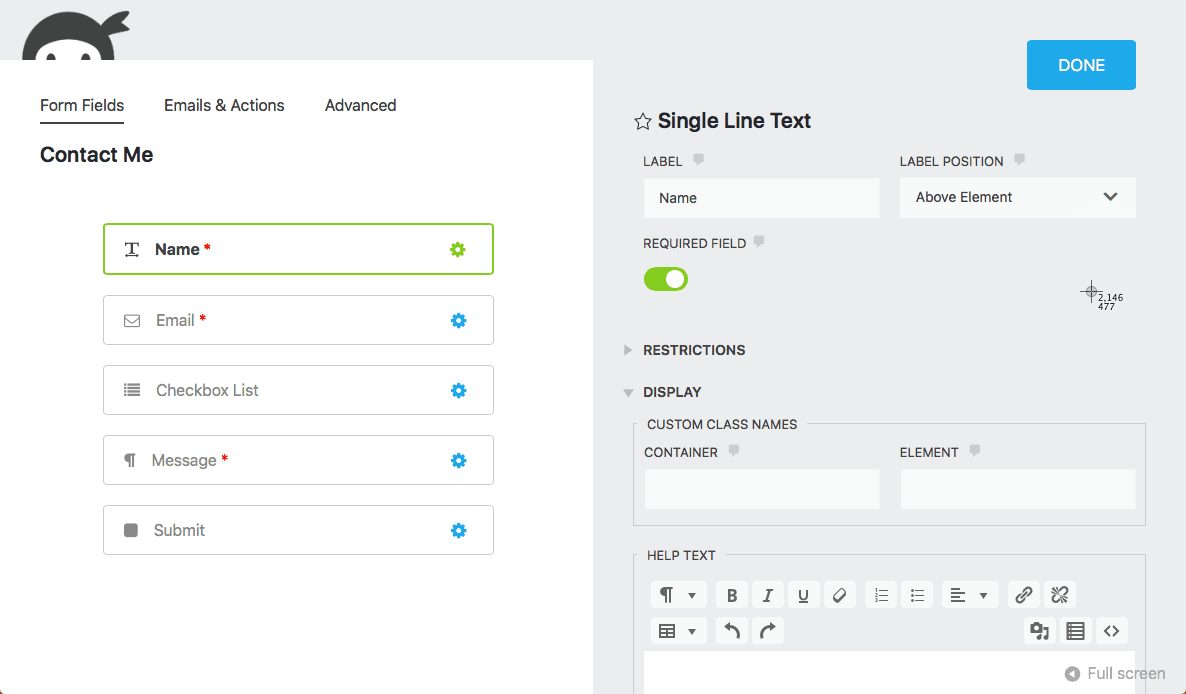
Ninja Forms takes the opposite approach: a genuinely free "Core" plugin, downloadable from WordPress.org with no time limit, no submission cap, and no restriction on how many sites you install it on. Core covers drag-and-drop building, standard field types (text, email, phone, dropdown, checkbox, file, and more), and basic email notifications.
The catch is that almost everything past that baseline is sold as a separate add-on layered on top of Core. Conditional logic, payment gateways (Stripe and PayPal), multi-part (multi-step) forms, and several other commonly-needed features aren't included in Core — they require Ninja Forms' paid plans, which bundle a set of official add-ons together rather than selling them individually.
Ninja Forms pricing (annual, per published pricing page):
| Tier | Sites | Price/year |
|---|---|---|
| Core | Unlimited | $0 |
| Plus | 3 | $99 |
| Pro | 20 | $199 |
| Elite | Unlimited | $499 |
Unlike Gravity Forms, Ninja Forms' free tier has no site-count limit — you can run Core on as many sites as you want, for as long as you want, before ever considering an upgrade.
Free plan: what you actually get
This is the most consequential difference, but it cuts in an unintuitive direction. Gravity Forms has no free plan, full stop — so there's nothing to evaluate there beyond "you pay $59/year minimum." Ninja Forms does have a free plan, but the practical ceiling on what it can do is lower than it first appears:
- No conditional logic on Core — showing or hiding a field based on a previous answer requires the Conditional Logic add-on, bundled starting at Plus ($99/year).
- No payment fields on Core — Stripe and PayPal both require paid add-ons.
- No multi-step forms on Core — the Multi-Part Forms add-on is a paid-tier feature.
- No file uploads on Core in any meaningful capacity beyond the most basic case.
In practice, if you're building a genuinely simple contact form with no branching logic and no payment step, Ninja Forms Core does the job at $0 and Gravity Forms costs you $59/year for functionality you won't use. But the moment a form needs conditional logic, a payment field, or a multi-step layout — which describes most forms beyond a basic contact page — both plugins put you in front of a paywall, and Ninja Forms' Plus tier ($99/year for 3 sites) ends up costing more than Gravity Forms Basic ($59/year for 1 site) unless you specifically need those 3 site licenses.
Conditional logic
Gravity Forms' conditional logic, available from its cheapest Basic tier, supports both field-level and full-page (multi-page form) conditional rules — show or hide an entire page of the form based on an earlier answer, not just individual fields. Rule groups support AND/OR logic, and the interface is a straightforward "if / then" builder embedded directly in the field settings panel.
Ninja Forms' Conditional Logic add-on, once purchased via Plus or higher, covers the same core show/hide-on-condition functionality at the field level. It's capable for standard use cases but doesn't extend to whole-page conditional logic the way Gravity Forms' does — if you need to skip an entire step of a multi-step form based on a prior answer, Gravity Forms handles that more directly.
Payment integrations
Both plugins gate payments entirely behind a paid tier — this is one of the few areas where they're identical rather than different. Gravity Forms supports Stripe, PayPal, Square, and Authorize.Net starting from Basic. Ninja Forms supports Stripe and PayPal through paid add-ons starting at Plus, with a narrower set of supported gateways than Gravity Forms offers.
Neither plugin's free tier — and for Gravity Forms, there is no free tier — includes payment processing. If the actual reason you're comparing these two is "I want to accept a payment on my WordPress site without paying for a plugin license first," neither one gets you there; see the alternative section below.
Multi-step forms
Gravity Forms supports multi-page forms from Basic, with a configurable progress indicator and the whole-page conditional logic mentioned above — skip an entire page based on an earlier response, not just individual fields within it. Ninja Forms' Multi-Part Forms add-on (Plus tier and above) covers standard multi-step pagination but without that page-level conditional skip capability.
For an application form, a multi-step quote request, or any form broken into logical sections, Gravity Forms' implementation is more capable once you're paying either way — and you start paying for it at a lower price point ($59/year) than Ninja Forms' equivalent ($99/year).
Entry management and reporting
Gravity Forms includes full entry management — a searchable, filterable list of every submission, CSV export, and the ability to edit or re-notify on a past entry — starting from Basic. Ninja Forms Core stores entries too, but deeper filtering, CSV export, and entry editing after submission are Plus-tier features.
Developer extensibility and the add-on ecosystem
This is where Gravity Forms' decade-plus head start shows most clearly. Its hook-based API (gform_* actions and filters) is deeply documented and widely supported by third-party plugins, page builders, and marketing tools that build Gravity Forms integrations as a matter of course — if you're a developer building custom logic on top of a form plugin, or an agency that needs a specific niche integration, Gravity Forms' ecosystem is larger and more mature.
Ninja Forms has its own hook system and a real add-on marketplace, but it's smaller, and third-party developers are less likely to have already built an integration for it compared to Gravity Forms. For a straightforward form with standard needs, this difference won't matter. For a complex custom build — a form that needs to talk to an internal API, trigger a specific CRM workflow, or integrate with a niche page builder — Gravity Forms' ecosystem depth is a real advantage.
Pricing side by side
At every paid tier past the free Core plugin, Gravity Forms is cheaper than Ninja Forms' equivalent — sometimes by a wide margin, as at the top end where Gravity Forms Elite (unlimited sites) is roughly half the price of Ninja Forms Elite. The only scenario where Ninja Forms is cheaper is if $0 genuinely covers your needs and you never touch a paid add-on — the moment you need conditional logic or payments, Gravity Forms' Basic tier at $59/year undercuts Ninja Forms' Plus tier at $99/year.
Pros and cons
Gravity Forms
- Most mature developer ecosystem and hook-based API of any plugin in this comparison
- Conditional logic, payments, and entry management all included from the cheapest paid tier
- Cheaper than Ninja Forms at every comparable paid tier
- No free plan at all — $59/year minimum just to install it
- Site-count-limited even at the entry tier (1 site on Basic)
Ninja Forms
- Genuinely free Core plugin with no site-count limit and no time limit
- Solid choice for a simple contact or lead-gen form with no branching logic
- No conditional logic, payments, multi-step forms, or meaningful file uploads without a paid add-on
- More expensive than Gravity Forms once you do need those features
- Smaller developer ecosystem and add-on marketplace than Gravity Forms
Who should choose Gravity Forms
Pick Gravity Forms if you're building forms professionally — for an agency, a business site with real budget, or any project where conditional logic, payments, or a complex custom integration are known requirements from the start. Its ecosystem depth and whole-page conditional logic make it the stronger pick once you've accepted you're paying for a form plugin either way.
Who should choose Ninja Forms
Pick Ninja Forms if your actual need is a simple, no-branching contact or lead-gen form and you want to spend $0 doing it, with the flexibility to install it on unlimited sites without a license check. It's also a reasonable starting point if you're not yet sure whether you'll need conditional logic or payments down the line and want to delay that decision without committing to a paid plugin upfront.
A quick decision checklist
- You need conditional logic or payments and have budget for it → Gravity Forms. Its Basic tier ($59/yr) is cheaper than Ninja Forms' equivalent Plus tier ($99/yr).
- You need a truly free, unlimited-site plugin for a simple form with no branching logic → Ninja Forms Core.
- You're building a complex multi-step form with page-level conditional logic → Gravity Forms — its whole-page conditional rules go further than Ninja Forms' field-level-only logic.
- You need a niche third-party integration → Gravity Forms, for the larger, more mature add-on ecosystem.
- You want conditional logic and payments without paying for a plugin license at all → Neither. See the alternative below.
A third option worth knowing about
If what actually stopped you in this comparison was realizing that neither plugin gives you conditional logic and payments for free, that's specific to Gravity Forms and Ninja Forms — not universal across WordPress form plugins. ChargeForms includes conditional logic, Stripe and PayPal payments (including subscriptions, at $0 platform fee), multi-step forms, file uploads, and full entry management on its free plan, with no submission cap and no per-site license required to unlock any of that.
Paid ChargeForms tiers only change how many sites a single license activates on, starting at $69/year for one site — never which features are available. If you want the direct numbers: ChargeForms vs. Gravity Forms and ChargeForms vs. Ninja Forms, or the full pricing page.
The bottom line
Gravity Forms and Ninja Forms solve the same problem from opposite directions — one charges upfront and gives you everything from day one, the other is free until you need almost anything beyond a basic contact form. If you already know you need conditional logic or payments, Gravity Forms is both the more capable plugin and, once you account for Ninja Forms' paid add-ons, the cheaper one. If you're certain your form will stay simple, Ninja Forms Core is a genuinely free way to get there.
And if the real answer is "I don't want to pay for conditional logic or payments at all," that's the gap neither of these two plugins closes — which is the specific problem ChargeForms' free plan was built to solve.
Frequently asked questions
Is Gravity Forms better than Ninja Forms?
It depends on budget and how much you need out of the box. Gravity Forms is the more capable plugin from the moment you install it — but it requires a paid license (starting at $59/year) before you can build a single form. Ninja Forms' free Core plugin is a genuinely usable form builder, but conditional logic, payments, multi-step forms, and file uploads all require paid add-ons on top of it.
Does Ninja Forms have a free version?
Yes — Ninja Forms Core is free and available on WordPress.org, with no submission cap and unlimited site installs. It covers the basics: drag-and-drop building, standard field types, and email notifications. Anything past that (conditional logic, Stripe/PayPal, multi-step forms, file uploads) requires the Plus plan or higher, starting at $99/year for 3 sites.
Is there a free version of Gravity Forms?
No. Gravity Forms has never offered a free tier. Every plan requires payment starting at Basic ($59/year for 1 site), which is the single biggest practical difference between it and Ninja Forms, WPForms, Fluent Forms, Formidable Forms, and ChargeForms — all of which have a genuine free plan.
Can I migrate my forms from Ninja Forms to Gravity Forms?
There's no official one-click migration tool between the two — they store entries and form structure in incompatible database schemas. In practice, migrating means rebuilding each form manually in Gravity Forms' builder and exporting existing Ninja Forms entries to CSV first so historical submission data isn't lost. For a handful of straightforward forms, rebuilding by hand is usually faster than debugging a third-party migration plugin.
How does Gravity Forms compare to Formidable Forms?
Similar shape to the Ninja Forms comparison: Gravity Forms has no free plan (Basic starts at $59/year), while Formidable Forms does have a free tier, though it excludes payments, conditional logic, and multi-page forms until at least the Business plan ($399/year for 7 sites). Gravity Forms' paid tiers are meaningfully cheaper than Formidable's equivalent tiers — Gravity Forms Elite (unlimited sites) is $259/year versus Formidable's Elite at $599/year.
Is WPForms or Ninja Forms better?
WPForms Lite and Ninja Forms Core are both free but similarly restrictive — neither includes conditional logic, payments, or multi-step forms without upgrading. Ninja Forms' paid tiers are somewhat cheaper at the low end (Plus is $99/year for 3 sites vs. WPForms Basic at $99/year for just 1 site), so Ninja Forms generally gives more sites per dollar once you're paying either way.
Related posts


Contact Form 7 Is in Maintenance Mode: What That Actually Means
Contact Form 7's creator confirmed at WordCamp Asia 2026 that version 6.2 is the last feature release — the plugin now gets security patches only. Here's what changes, what doesn't, and what to actually do about it.