Fluent Forms vs WPForms (2026): Which WordPress Form Plugin Actually Wins?
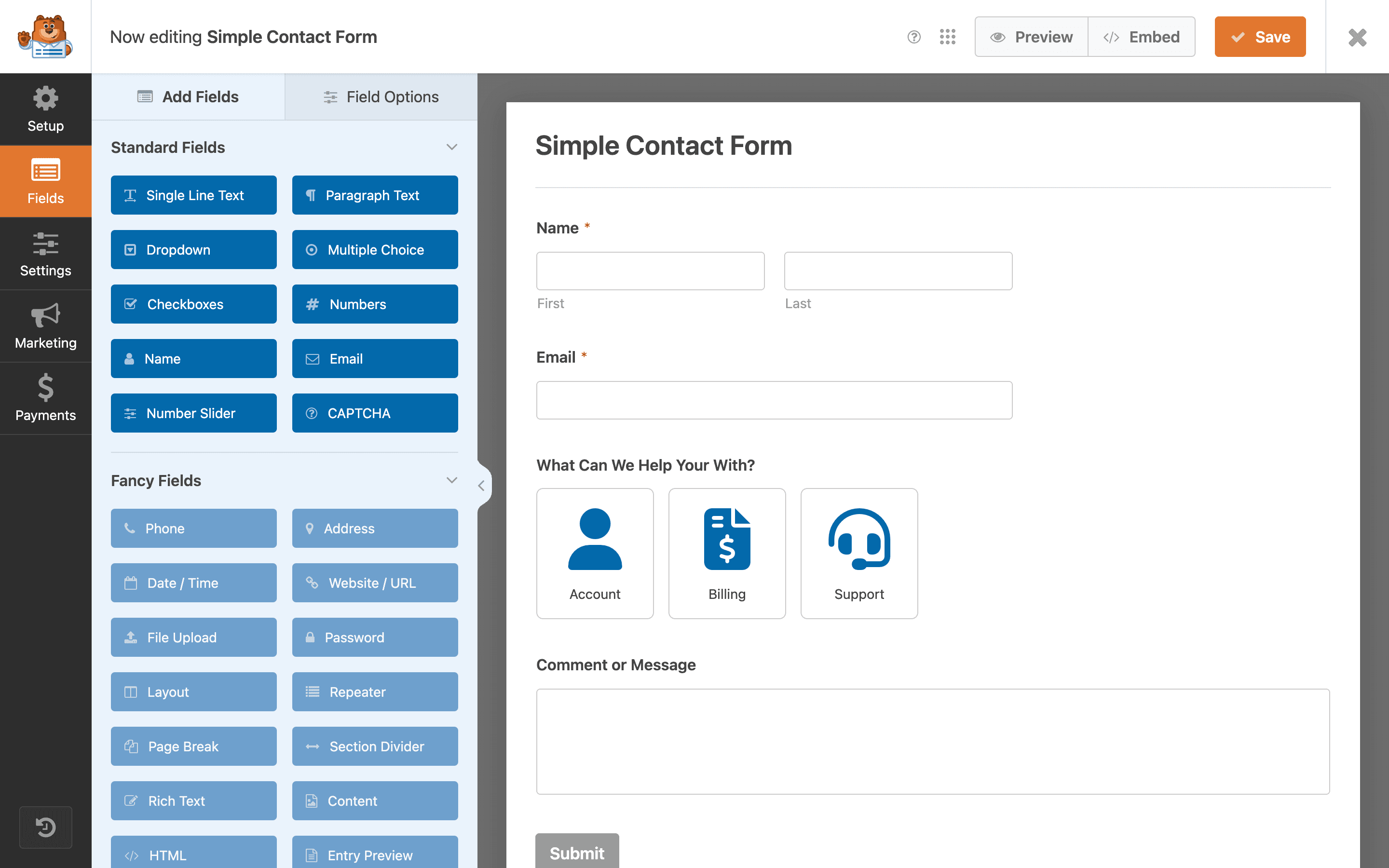
Fluent Forms and WPForms are the two most-installed form builders in the WordPress.org plugin repository outside of the page-builder ecosystem, and if you're reading this, you're probably trying to pick one before you've built a single form. This comparison goes tier by tier — free plan, paid plans, conditional logic, payments, templates, support — using each plugin's actual published pricing and documented feature list as of 2026, not marketing copy.
The short answer: Fluent Forms gives you more for less money at every paid tier, and its free plan includes conditional logic, which WPForms' free "Lite" plan does not. WPForms wins on ease of use for absolute beginners and has a larger template library. Neither plugin's free plan includes payment processing — if that's a dealbreaker for you, skip to the alternative section near the end.
Quick verdict
If you want the full breakdown behind those two visuals — including why WPForms still might be the right call for certain sites — keep reading.
What is Fluent Forms
Fluent Forms is a WordPress form builder developed by WPManageNinja, the team behind FluentCRM and FluentSMTP. It launched later than WPForms and Gravity Forms, and has spent the years since aggressively pushing feature parity with paid competitors into its free tier — that positioning is central to why it consistently ranks as one of the highest-rated free form plugins on WordPress.org.
The free version (just "Fluent Forms") includes over 50 field types, drag-and-drop form building, conditional logic with nested AND/OR rules, basic entry management, and email notifications. Fluent Forms Pro adds payment gateways, advanced reporting, multi-step form progress bars, PDF generation, and roughly 30 additional integrations with CRM and marketing tools.
Fluent Forms pricing (annual, per published pricing pages):
| Tier | Sites | Price/year |
|---|---|---|
| Free | Unlimited | $0 |
| Single Site | 1 | $79 |
| Agency | 5 | $159 |
| Unlimited | Unlimited | $299 |
What is WPForms
WPForms is one of the oldest and most widely installed WordPress form plugins, built by Awesome Motive (the company behind OptinMonster and MonsterInsights). Its positioning is different from Fluent Forms: instead of pushing features into the free tier, WPForms leans on a large pre-built template library (1,900+ templates across the WPForms ecosystem) and heavy documentation aimed at non-technical site owners.
WPForms Lite, the free version listed on WordPress.org, is intentionally minimal — a basic contact form builder with a handful of field types and no conditional logic, payments, or file uploads. Everything past a simple contact form requires a paid license, and WPForms splits its paid tiers by both feature access and site count, which is a meaningfully different pricing model than Fluent Forms' site-count-only tiers.
WPForms pricing (annual, per published pricing pages):
| Tier | Sites | Price/year |
|---|---|---|
| Lite | 1 | $0 |
| Basic | 1 | $99 |
| Plus | 3 | $199 |
| Pro | 5 | $399 |
| Elite | Unlimited | $599 |
Free plan: what you actually get
This is where the two plugins diverge the most, and it's the single biggest factor in which one is right for you if budget matters at all.
Fluent Forms' free plan is unusually generous for the category. Conditional logic — showing or hiding fields based on a previous answer — is normally one of the first features locked behind a paywall across the WordPress plugin ecosystem, and Fluent Forms includes it free, along with a large field library and basic multi-step forms.
WPForms Lite is the opposite approach. It covers the absolute minimum: name, email, message, a few basic fields, and email notifications. No conditional logic. No payments. No file uploads. No entry management beyond what arrives in your inbox. WPForms is explicit that Lite exists primarily as a lead-in to the paid plans, not as a genuinely complete free tool — and to be fair to them, they don't pretend otherwise in their own documentation.
If you're building anything beyond a static contact form — a multi-step intake form, a form that shows different fields based on a previous answer, an application form with file uploads — Fluent Forms' free plan will get you there. WPForms Lite will not, and you'll hit the upgrade prompt on the first attempt to add conditional logic.
Ease of use and setup
WPForms consistently gets the edge here, and it's worth being honest about why: its drag-and-drop builder is simpler because it does less. Fewer options per field, a more linear building flow, and a template library that lets a non-technical user pick something close to what they need and just swap in their own copy. For someone building their very first WordPress form with zero prior experience, WPForms' onboarding is genuinely smoother.
Fluent Forms' builder is more capable but has a steeper initial learning curve — the conditional logic UI, the nested field groups, and the sheer number of configuration options per field type mean there's more to learn before you're fully comfortable. Most users report the learning curve flattens out within the first one or two forms, but that first form does take longer to build in Fluent Forms than in WPForms.
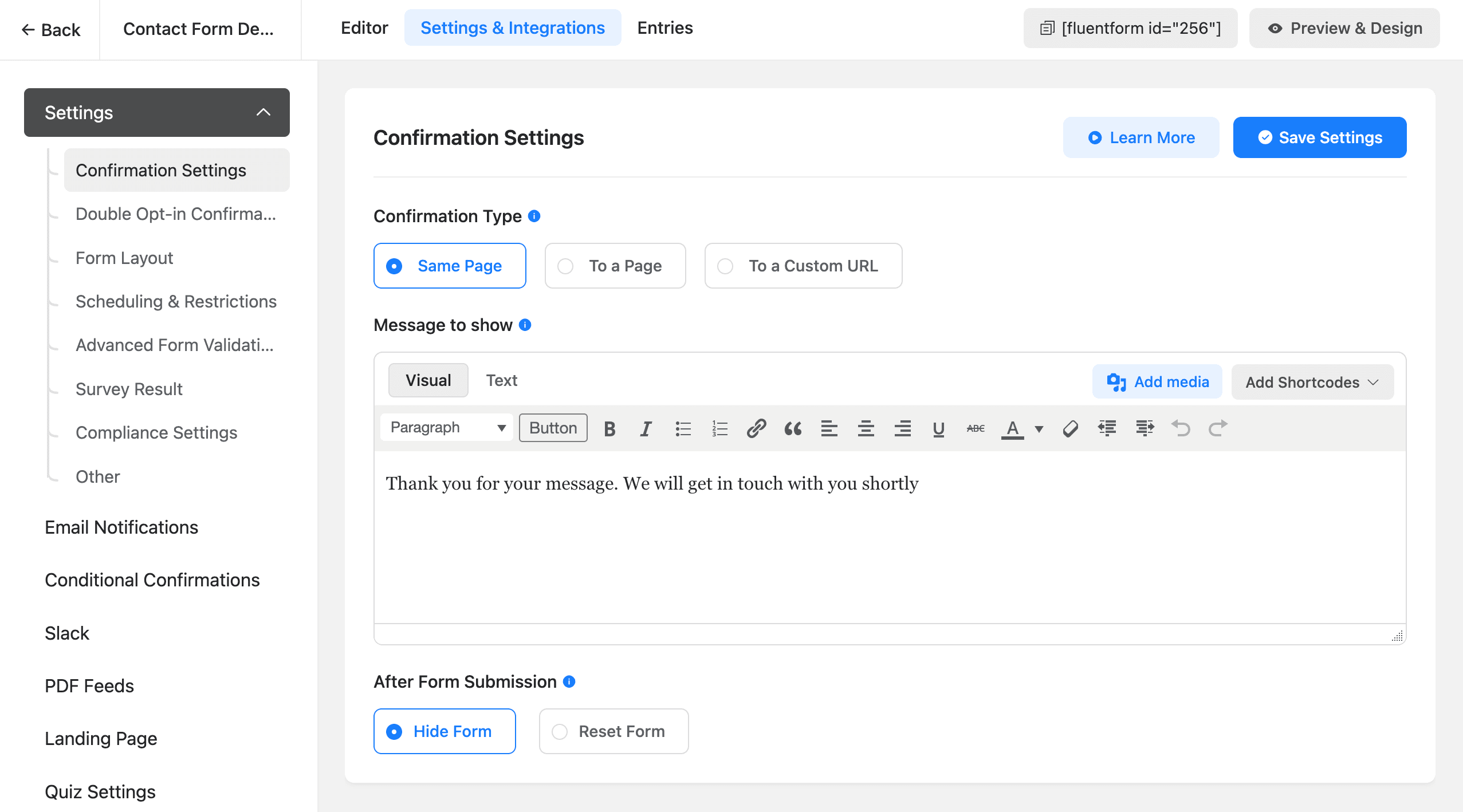
If you're a developer or you're building forms professionally for clients, this gap matters less — you'll learn either interface in under an hour. If you're a solo site owner building your only contact form once and never touching it again, WPForms' simplicity has real value.
Field types and templates
Both plugins cover the standard field set — text, email, phone, dropdown, checkbox, radio, date, file upload, signature, rating, and address fields. Fluent Forms edges ahead on total field count (60+ across free and Pro combined, including net promoter score fields, repeater fields, and a dedicated survey/poll field type that WPForms doesn't have an equivalent for). WPForms counters with a much larger template library — pre-built form layouts for specific use cases (event registration, job applications, donation forms, RSVP forms) that you can start from instead of building from a blank canvas.
If you build forms often and want a head start every time, WPForms' template library saves real time. If you need a field type that's slightly unusual — a Likert-scale survey question, for example — Fluent Forms is more likely to have it built in rather than requiring a workaround.
Conditional logic
Already covered above at the free-tier level, but it's worth detailing the paid-tier depth too. Fluent Forms Pro's conditional logic supports nested AND/OR/NOT rule groups, letting you build genuinely complex branching logic — show this field only if the answer to question 3 was "yes" AND the answer to question 7 was NOT "other." WPForms' conditional logic (Plus plan and above) covers the same basic show/hide-on-condition functionality but with a flatter rule structure that's harder to use for deeply branched forms.
For simple two- or three-condition forms, both are equally capable. For genuinely complex application or intake forms with many branching paths, Fluent Forms' rule engine is more flexible.
Payment integrations
Neither plugin includes payment processing on its free tier — this is one of the few points where Fluent Forms and WPForms are identical, and it's a real gap if you're trying to build a payment form without paying for a plugin license first.
On paid plans, both integrate with Stripe and PayPal, and both support one-time and subscription payments. WPForms additionally supports Square and Authorize.Net on its higher tiers; Fluent Forms Pro supports Stripe, PayPal, Mollie, and Razorpay, which matters more if you're outside the US/EU and need a regional gateway like Razorpay for Indian customers.
If payments are the actual reason you're evaluating form plugins — not just a nice-to-have — this is the point where it's worth knowing that this restriction isn't universal across every WordPress form plugin. More on that below.
Multi-step forms
Both plugins support multi-step (paginated) forms. Fluent Forms includes basic multi-step support on its free plan; the progress-bar UI and step-conditional logic (skip a step entirely based on a previous answer) require Pro. WPForms' multi-step support — sold as "Form Pages" and a separate "Conversational Forms" add-on — is Pro-tier only across the board, with no multi-step capability on Lite at all.
For anything resembling an application form, a multi-step checkout flow, or a survey broken into sections, Fluent Forms gives you a working starting point for free, while WPForms requires an upgrade before you can build a multi-step form at all.
Reporting and entry management
Fluent Forms' free plan includes basic entry management — you can view, search, and export submissions as CSV. Pro adds visual reporting (charts breaking down responses to individual questions, useful for survey-style forms) and entry editing after submission.
WPForms Lite gives you almost nothing here beyond the email notification itself; entries aren't stored in a browsable list at all until you upgrade. This is a meaningful practical difference if you ever need to look up a submission from three weeks ago and the person's email arrived in a Gmail folder you've since archived — Fluent Forms free keeps a searchable record, WPForms Lite doesn't.
Integrations and add-ons
Both plugins connect to the usual marketing and CRM stack — Mailchimp, ActiveCampaign, HubSpot, Zapier, Google Sheets, Slack — though most of these integrations sit behind a paid tier on both plugins. WPForms has a slightly larger third-party integration count due to its longer market presence and larger user base attracting more community-built add-ons. Fluent Forms has an advantage if you're already using other WPManageNinja products (FluentCRM, FluentSMTP, FluentBooking) — the integration between their own products is deeper and requires no separate configuration.
Support and documentation
WPForms has the more mature documentation library and a larger support team, a natural result of being on the market longer with a bigger install base. Response times on paid-tier support tickets are generally fast for both, and both offer live chat on higher tiers. Fluent Forms' documentation has improved significantly in recent years but still has more gaps for edge-case configurations than WPForms' knowledge base.
For teams that expect to lean on support documentation heavily rather than figuring things out themselves, WPForms' more polished resources are worth factoring in.
Spam protection and security
Every public-facing form is a spam target, and both plugins take spam protection seriously, but with different default approaches. Fluent Forms ships with honeypot fields enabled by default on the free plan (an invisible field that trips up bots but is never seen by real visitors), plus optional Google reCAPTCHA v2/v3, hCaptcha, and Cloudflare Turnstile integrations available even on the free tier — a rare case of a security feature Fluent Forms doesn't gate behind Pro.
WPForms also supports honeypot, reCAPTCHA, hCaptcha, and Turnstile, but its own spam-filtering layer beyond the basic honeypot — the "Akismet integration" and custom spam-word filtering — is a Pro-tier feature. On Lite, you're limited to honeypot and whatever CAPTCHA provider you configure yourself.
Neither plugin has had a major security disclosure in recent years that stands out from the other; both are actively maintained with regular update cadences, and both follow WordPress core's nonce-based CSRF protection for form submissions. If security posture is a deciding factor, the practical difference is narrow — the bigger factor is how promptly you apply plugin updates on your own site, which matters more than the plugin choice itself.
Performance and page load impact
Form plugins load their own CSS and JavaScript on any page where a form is embedded, and both Fluent Forms and WPForms are reasonably well-optimized compared to older, heavier competitors in the category — both use conditional asset loading, meaning the form's scripts and styles only load on pages that actually contain a form shortcode or block, not sitewide.
In practice, independent page-speed testing tends to show Fluent Forms shipping a marginally smaller JavaScript payload per form than WPForms, though the difference is small enough (typically under 50KB) that it rarely shows up as a meaningful Core Web Vitals difference on a well-optimized site. If your site is already struggling with page speed, the bigger wins will come from image optimization, caching, and reducing the number of other plugins running — not from choosing one of these two form plugins over the other.
Pricing side by side
At every comparable tier, Fluent Forms costs less — sometimes significantly less, as at the unlimited-site tier where Fluent Forms is roughly half the price of WPForms Elite. WPForms' higher price reflects its larger support team, template library, and longer track record, but if raw cost-per-site-license is your deciding factor, Fluent Forms wins clearly.
Pros and cons
Fluent Forms
- Free plan includes conditional logic, a large field library, and basic multi-step forms
- Cheaper at every paid tier, sometimes by a wide margin
- More flexible conditional logic engine (nested AND/OR/NOT)
- Deep integration with other WPManageNinja tools (FluentCRM, FluentSMTP)
- Steeper initial learning curve than WPForms
- Smaller third-party integration and template ecosystem
WPForms
- Easiest builder for absolute beginners
- Largest template library in the category
- Most mature documentation and support ecosystem
- Free "Lite" plan is extremely limited — no conditional logic, payments, file uploads, or entry management
- More expensive at every comparable paid tier
- No usable multi-step form support until Pro
Who should choose Fluent Forms
Pick Fluent Forms if budget matters, you need conditional logic or basic multi-step forms without paying immediately, or you're already using FluentCRM or another WPManageNinja product. It's also the stronger pick for anyone building survey-style forms, given its dedicated poll/survey field types and more capable conditional logic engine.
Who should choose WPForms
Pick WPForms if you're building your first WordPress form ever and want the gentlest possible learning curve, if you want to start from a pre-built template rather than a blank canvas, or if you expect to rely heavily on documentation and support rather than figuring configuration out yourself. It's a reasonable choice for agencies that already standardize on WPForms across client sites and value its support SLAs.
A quick decision checklist
If you're still not sure after all of the above, run through these in order — the first one that applies to you should decide it:
- You need conditional logic and can't pay right now → Fluent Forms. It's the only one of the two with conditional logic on the free plan.
- You've genuinely never built a WordPress form before and want the gentlest ramp-up → WPForms. Its builder and templates are the easier starting point.
- You're building a survey, application form, or anything with branching logic across many questions → Fluent Forms. Its nested conditional logic and dedicated survey fields handle this better.
- You want the largest pre-built template library and don't mind paying more for it → WPForms.
- You need Stripe or PayPal on the free plan, full stop → Neither. See the alternative below.
- You're standardizing across many client sites and value support SLAs above all else → WPForms, for the more mature support infrastructure.
- Cost-per-site-license is your primary constraint → Fluent Forms, at every tier.
A third option worth knowing about
If the real dealbreaker in this comparison for you was that neither free plan includes payment processing, it's worth knowing that's a WPForms/Fluent Forms-specific limitation, not an industry-wide one. ChargeForms takes a different approach to the free tier entirely: conditional logic, Stripe and PayPal payments (including subscriptions), multi-step forms, file uploads, and full entry management with CSV export are all included on the free plan, with no submission cap and no time limit. Paid tiers only change how many sites a single license activates on — not which features you get access to.
That's a genuinely different pricing philosophy from both plugins covered above, both of which use payments as one of the primary features locked behind a paid upgrade. If you want the specifics, see the direct breakdowns: ChargeForms vs. Fluent Forms and ChargeForms vs. WPForms, or the full pricing page.
The bottom line
Fluent Forms and WPForms are both mature, reliable WordPress form plugins used by millions of sites, and you won't build a broken product on either one. The decision mostly comes down to two questions: how much of your form-building do you want to happen for free before you pay, and how much do you value a gentle learning curve over raw feature depth.
If the answer to the first question is "as much as possible," Fluent Forms' free plan gets you further. If the answer to the second is "I want the easiest possible starting point regardless of eventual cost," WPForms is worth the premium. And if what you actually needed all along was payments without paying for a plugin license first, that's the one feature neither of these two covers on their free plan — which is the gap ChargeForms was built to close.
Frequently asked questions
Is Fluent Forms better than WPForms?
Fluent Forms generally offers more for less money — its free plan includes conditional logic and its paid tiers are cheaper than WPForms' equivalent site-count tiers. WPForms wins on beginner-friendliness and template variety. Neither free plan includes payments; for that, ChargeForms is the only major option that includes Stripe and PayPal on its free tier.
Does WPForms Lite include conditional logic?
No. WPForms Lite (the free version) does not include conditional logic, payments, or file uploads. All three require at least the Plus plan ($199/year for 3 sites).
Does Fluent Forms free plan include payments?
No. Fluent Forms' free plan includes conditional logic and a large field library, but Stripe, PayPal, and other payment integrations require Fluent Forms Pro. ChargeForms is the exception among major WordPress form plugins — its free plan includes Stripe and PayPal.
Which is cheaper, Fluent Forms or WPForms?
Fluent Forms is cheaper at every comparable tier. A single-site Fluent Forms license runs about $79/year versus $99/year for WPForms Basic, and the gap widens at higher tiers — Fluent Forms' unlimited-site tier is $299/year against WPForms Elite at $599/year.
Can I migrate from WPForms or Fluent Forms without losing my forms?
Both plugins store entries in their own database tables, so there's no native one-click migration between them. Rebuilding forms in a new plugin is usually faster than trying to migrate entry data, especially for simple contact and lead-gen forms.
Is there a WordPress form plugin with no feature restrictions on the free plan?
ChargeForms is built specifically to avoid the freemium model both Fluent Forms and WPForms use — conditional logic, Stripe/PayPal payments, multi-step forms, and file uploads are all included on the free plan, with paid tiers only changing how many sites a license activates on.
Related posts



Contact Form 7 Is in Maintenance Mode: What That Actually Means
Contact Form 7's creator confirmed at WordCamp Asia 2026 that version 6.2 is the last feature release — the plugin now gets security patches only. Here's what changes, what doesn't, and what to actually do about it.