WordPress Form Entries: How to Store, Search, and Follow Up
Email notifications are useful, but they should not be the only place your WordPress form submissions exist. A dependable entries workflow gives your team a searchable record, a way to mark progress, and a safer handoff between people.
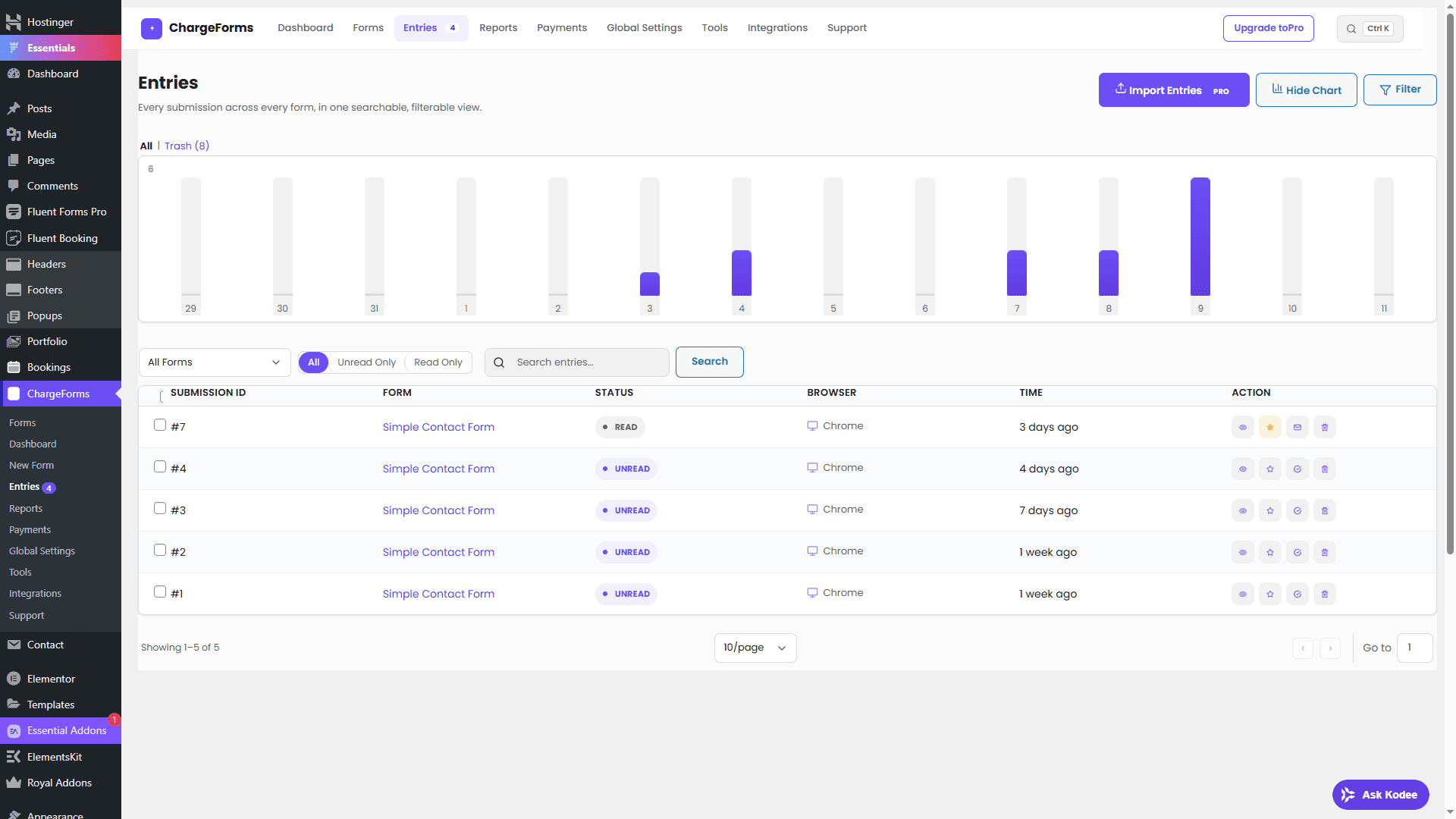
What a useful entries screen should provide
Look for these basics:
- Form and date filters
- Search across relevant submitted values
- Read or unread status
- A clear single-entry view
- Notes or internal follow-up context
- Permission-aware access
- Export only when the workflow needs it
The point is not to build a second CRM. It is to make sure a legitimate enquiry does not disappear in an inbox.
A simple follow-up workflow
- Review new entries at a predictable time.
- Mark an entry read when someone has seen it.
- Add a short internal note when ownership changes.
- Reply through the appropriate channel.
- Export only the records needed for a separate system.
Use statuses consistently. If “unread” means nobody has reviewed the enquiry, do not also use it to mean “not yet qualified.” Separate those concepts with an internal note or connected workflow.
Protect stored submissions
Form entries can contain personal information. Limit the WordPress capability required to view them, use HTTPS, avoid displaying unnecessary fields in notifications, and define how long the records should be retained.
Do not include full payment details or sensitive credentials in a form entry. A payment processor should handle payment secrets; the form should store only the reference information your workflow needs.
Search and export responsibly
Search is safer than downloading everything. When a CSV export is required, restrict who can create it, store it in a protected location, and delete old copies. Treat an exported file like a copy of your database, not like a harmless spreadsheet.
ChargeForms keeps entries in its admin Entries screen with search, filters, statuses, and entry actions. Start with the lead generation form guide, then review GDPR-conscious WordPress forms before collecting sensitive data.
A good entry system is quiet infrastructure: it helps the right person find the right enquiry without making the visitor fill out a longer form.
Frequently asked questions
Where should WordPress form submissions be stored?
Store submissions in a protected admin view with searchable records, access controls, and a clear retention policy. Avoid relying only on email, because inboxes are difficult to audit and filter as volume grows.
How do I search WordPress form entries?
Use an entries screen that can filter by form, date, status, and searchable field values. This makes it easier to find a lead without opening every email notification.
Can I export WordPress form submissions to CSV?
Many form plugins provide CSV export. Before exporting, limit access to the file, store it securely, and remove it when it is no longer needed.
Related posts

