Contact Form 7 vs Gravity Forms (2026)
Contact Form 7 and Gravity Forms sit at opposite ends of the WordPress form-plugin spectrum — one is free, minimal, and shortcode-based; the other is a paid, fully-featured builder with no free tier at all. If you're comparing them directly, you're usually not choosing between two similar products, you're deciding whether your form's requirements have outgrown "free and basic."
Quick verdict
"Payments, core" is marked partial for Gravity Forms because Stripe/PayPal require its Pro license ($159/year) — the cheaper Basic tier ($59/year) doesn't include them. Contact Form 7 has no payment capability at all without a third-party add-on.
The short answer: Contact Form 7 wins on cost (free, always) and footprint (lighter, fewer moving parts). Gravity Forms wins on everything else a form plugin is actually asked to do once requirements go past "collect a name, email, and message" — entry storage, a real builder, conditional logic, and payments, all without stacking third-party add-ons. The decision usually comes down to whether your form's actual needs have crossed that line.
What is Contact Form 7
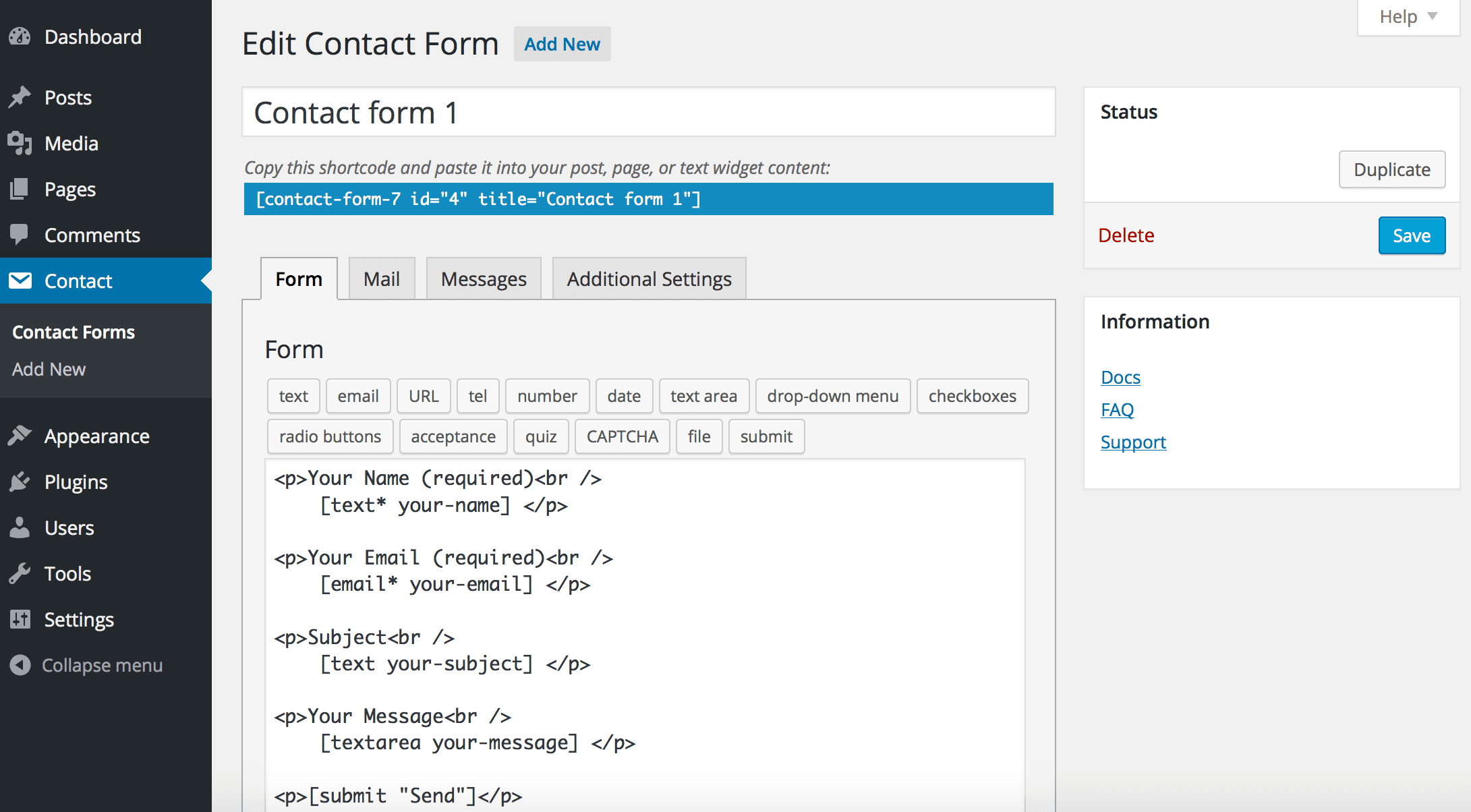
Contact Form 7 is the most-installed form plugin in the WordPress.org directory — over 10 million active installs — and has existed largely unchanged in philosophy since its earliest versions: a free, extremely lightweight plugin that renders a form from shortcode-style markup you write directly, like [text* your-name] and [email* your-email].
There's no visual builder — editing a form means editing that markup in a plain textarea — and three structural gaps define most of why people eventually look elsewhere: no built-in entry storage (it emails a submission and discards it), no conditional logic without a third-party add-on, and no payment capability at all without one either.
Contact Form 7 pricing: Free, no paid tier exists.
What is Gravity Forms
Gravity Forms, built by Rocketgenius, takes the opposite approach: a commercial-only plugin with no free tier whatsoever, but feature-complete from the moment you buy a license — a real drag-and-drop visual builder, built-in entry management with CSV export, conditional logic (including whole-page conditional rules, not just field-level), multi-page forms, and the most mature third-party add-on ecosystem of any WordPress form plugin.
Gravity Forms pricing (annual, per published pricing page):
| Tier | Sites | Price/year | Payments included |
|---|---|---|---|
| Basic | 1 | $59 | No |
| Pro | 3 | $159 | Yes (Stripe, PayPal) |
| Elite | Unlimited | $259 | Yes |
See the full Gravity Forms pricing breakdown for exactly what's gated behind each tier — the Basic price is the headline number, but it doesn't include payments.
Entry storage: the single biggest practical gap
This is usually the first thing that actually breaks workflows for a Contact Form 7 site. Contact Form 7 emails a submission and then discards it entirely — no admin screen listing past submissions, no search, no CSV export. If that notification email is ever marked as spam, sent to a wrong address, or simply missed, the submission is gone with no record it happened. Flamingo, a free companion plugin by the same developer, adds basic entry storage, but it's a second plugin to install, configure, and keep updated — not something Contact Form 7 does natively.
Gravity Forms has entry management built in from day one: every submission is stored, searchable, exportable to CSV, and viewable in a dedicated admin screen — no companion plugin required.
Conditional logic
Contact Form 7 has no native conditional logic — showing or hiding a field based on an earlier answer requires a third-party add-on, with quality and maintenance status varying by developer. Gravity Forms includes conditional logic from its cheapest Basic tier, and goes further than most competitors with whole-page conditional rules — skipping an entire page of a multi-page form based on an earlier answer, not just individual fields.
Payments
Neither plugin includes payments on a genuinely free basis, but for different reasons. Contact Form 7 has zero payment capability in core — a third-party add-on is required, and most actively-maintained free options are limited (often one-time payments only, with inconsistent server-side amount verification). Gravity Forms has official Stripe and PayPal add-ons, well-documented and maintained directly by Rocketgenius, but they require the Pro license ($159/year) specifically — not the cheaper $59/year Basic tier.
If payments are the actual requirement driving this comparison, Gravity Forms Pro is the realistic entry price, not Contact Form 7 plus an uncertain third-party add-on.
Builder experience and install footprint
Contact Form 7's shortcode-based editing is the plugin's defining trade-off: it's fast to install and extremely lightweight on page load, but editing a form means hand-writing markup in a textarea rather than a visual drag-and-drop canvas with a live preview. Gravity Forms has a full visual builder — drag fields onto a canvas, configure each one in a side panel, preview as you go — at the cost of a heavier admin footprint than Contact Form 7's minimal approach.
For a single simple form that rarely changes, Contact Form 7's lighter footprint is a real advantage. For anyone building or editing forms regularly, the visual builder gap is usually decisive the other way.
Pros and cons
Contact Form 7
- Completely free, no paid tier exists
- Extremely lightweight, minimal admin footprint
- No entry storage without the separate Flamingo plugin
- No conditional logic or payments without third-party add-ons
- No visual builder — raw shortcode editing only
Gravity Forms
- No free tier — $59/year minimum, and payments require Pro ($159/year)
- Full visual drag-and-drop builder
- Entry storage, conditional logic, and multi-page forms all built in
- Most mature developer ecosystem and add-on library in the category
- Heavier than Contact Form 7 for a genuinely simple one-field form
Who should choose Contact Form 7
Pick Contact Form 7 if the actual requirement is a bare "send me a message" form — name, email, message — with no need to review past submissions, no branching logic, and no payment collection. It remains the fastest, lightest way to get exactly that live, for free, and a decade-plus of tutorials and theme integrations assume it's already installed.
Who should choose Gravity Forms
Pick Gravity Forms if any of the three structural gaps above — entry storage, conditional logic, or payments — are actual requirements, and budget for an annual license isn't a blocker. Its whole-page conditional logic and mature add-on ecosystem make it a stronger general-purpose choice for agencies and businesses building forms as a real part of their site, not just a contact page afterthought.
A third option worth knowing about
If what's driving this comparison is wanting Gravity Forms' feature set — entry storage, conditional logic, payments — without its $59-259/year license cost, that gap is specific to these two plugins, not universal. ChargeForms includes a visual drag-and-drop builder, built-in entry management, conditional logic (nested AND/OR/NOT), Stripe and PayPal payments (including subscriptions), and multi-step forms all on its free plan, at $0 platform fee, with paid tiers only changing how many sites a license activates on, starting at $69/year.
For the direct breakdown: ChargeForms vs. Gravity Forms, or see the wider field of Contact Form 7 alternatives and Gravity Forms alternatives if you want more than just these two options.
The bottom line
Contact Form 7 and Gravity Forms aren't really competing for the same use case — one is free minimalism for a form that needs almost nothing, the other is paid completeness for a form that needs almost everything. The honest question isn't "which plugin is better," it's "has my form's actual requirements crossed the line from a bare contact form into something that needs entry storage, logic, or payments" — and that answer points clearly at one or the other.
Frequently asked questions
Is Gravity Forms better than Contact Form 7?
For anything beyond a bare 'send me a message' form, yes — Gravity Forms has a visual builder, built-in entry storage, conditional logic, and payment add-ons natively, none of which Contact Form 7 has without third-party add-ons. The trade-off is cost: Contact Form 7 is free forever, Gravity Forms starts at $59/year with no free tier at all.
Does Contact Form 7 save form submissions?
Not by default. It emails a submission and discards it — no entries database, no CSV export, no way to see past submissions in wp-admin. Flamingo, a free companion plugin by the same developer, adds that, but it's a second plugin to install and maintain rather than a built-in feature.
Can I accept payments with Contact Form 7 or Gravity Forms?
Contact Form 7 has no payment capability at all without a third-party add-on. Gravity Forms has official Stripe and PayPal add-ons, but they require the Pro license ($159/year) — the cheaper $59/year Basic tier doesn't include them.
Why does Contact Form 7 have 10 million installs if it's this limited?
Mostly inertia and genuine fitness for the narrowest use case — free, extremely lightweight, and the default a decade of tutorials and themes assume is already there. For a single bare contact form with no logic, no payments, and no need to review past submissions, it still does that one job well. The moment any of those three things matters, the comparison changes.
Is there a free plugin with Gravity Forms-level features?
ChargeForms' free plan includes a visual drag-and-drop builder, built-in entry management, conditional logic (nested AND/OR/NOT), and Stripe/PayPal payments at $0 platform fee — covering the gaps in Contact Form 7 without Gravity Forms' $59-259/year license cost. See the full breakdown below.
Related posts