
Is Ninja Forms Really Free? Full 2026 Review + Best Alternative
"Is Ninja Forms free?" is one of the most common questions people search before installing it, and the honest answer is more nuanced than a yes or no. The base plugin genuinely is free, with no trick expiration date and no artificial submission cap — but "free" only covers a fairly narrow slice of what most people actually need a form builder to do. This review breaks down exactly what's in the free Core plugin, what requires paying, real pricing across every tier, and which alternatives are worth considering if Core doesn't cover your use case.
Is Ninja Forms free? The short answer
Yes, with real limits. Ninja Forms Core — the version listed on WordPress.org — is free forever, with no submission limit, no time-based trial, and installable on unlimited sites. That's genuinely more generous than some competitors on the install-count front (WPForms Lite, for comparison, is a single-site license even on its free tier).
But Core is a deliberately minimal base. It handles the fundamentals well — a drag-and-drop builder, standard field types, email notifications, basic entry storage — but almost everything past that is either a paid add-on or requires upgrading to a paid plan entirely.
What's actually included in Ninja Forms Core (free)
- Drag-and-drop form builder with standard field types (text, email, textarea, dropdown, checkbox, radio, number)
- Unlimited forms and unlimited submissions
- Unlimited site installs — no site-count restriction on the free tier itself
- Basic email notifications on submission
- Basic entry storage (view and export submissions)
- A reasonably large template library to start from instead of a blank form
What requires a paid add-on or paid plan
This is the part that surprises people who install Core expecting a complete solution:
Notice the pattern: conditional logic, payments, file uploads, and multi-step forms — the four features that turn a form builder from "basic contact form" into "genuinely useful application" — are all outside Core's free tier. Ninja Forms sells these individually as add-ons in some purchase paths, or bundled into the Plus plan and above, but either way, none of them are free.
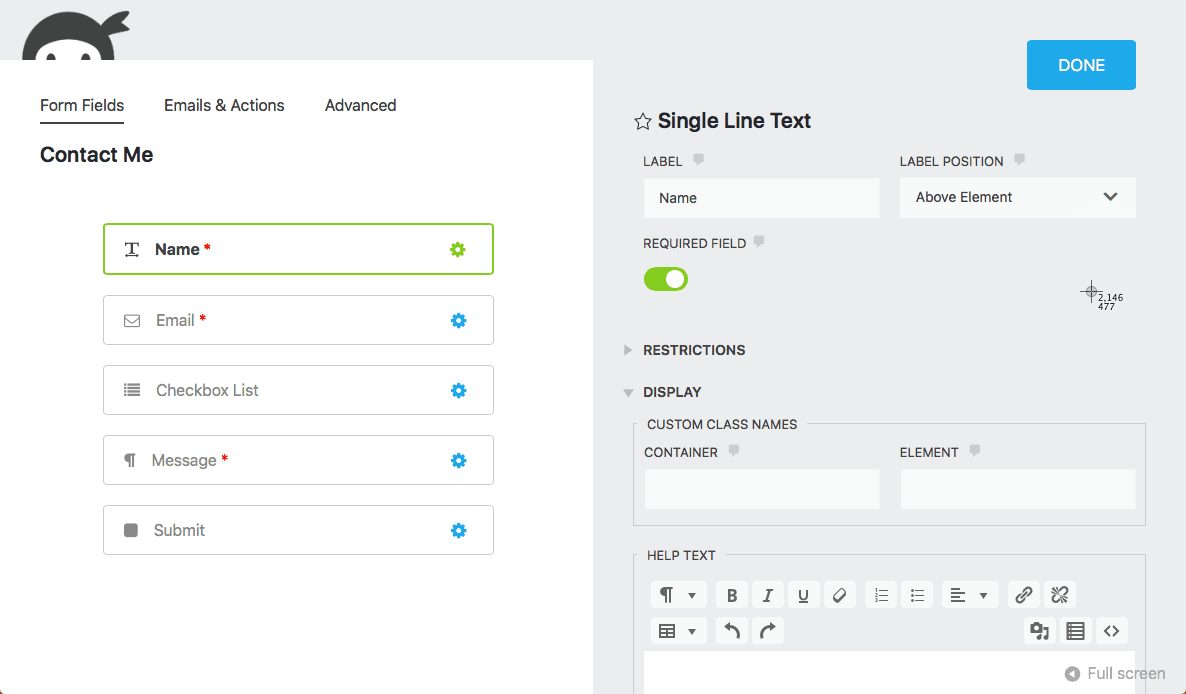
What the Ninja Forms builder actually looks like
Here's the real interface — the drag-and-drop canvas on the left, field panel on the right:
Selecting a field opens its settings panel, where label, required state, and basic display options are configured:
Ninja Forms pricing breakdown
| Tier | Sites | Price/year | What it adds over Core |
|---|---|---|---|
| Core | Unlimited | $0 | Base builder, no conditional logic/payments/uploads |
| Plus | 3 | $99 | Conditional logic, file uploads, basic add-ons |
| Pro | 20 | $199 | Payment gateways, more integrations |
| Elite | Unlimited | $499 | Full add-on library, priority support |
Exact add-on bundling has shifted between Ninja Forms' pricing tiers over time — always check the current plan comparison on their pricing page before purchasing, since which specific add-ons are bundled into Plus vs. Pro can change.
How the add-on model actually works
Ninja Forms' architecture is genuinely different from most competitors, and it's worth understanding before deciding whether it fits how you'd rather pay for software. Instead of a small number of fixed plans where every feature at a given tier is bundled together, Ninja Forms sells much of its functionality as individual add-ons — separate purchasable units for things like Conditional Logic, Stripe, PayPal, File Uploads, Multi-Part Forms, Mailchimp, ActiveCampaign, and dozens more.
In practice, most people end up buying a plan tier (Plus, Pro, or Elite) rather than piecing together individual add-ons one at a time, since the plans bundle a reasonable set of add-ons together for less than buying them all separately would cost. But the underlying architecture still shows through: which specific add-ons are bundled into which tier has shifted over time as Ninja Forms has restructured its pricing, so a comparison written even a year earlier can be stale on the specifics even if the general pattern (Core is minimal, everything meaningful costs extra) holds steady.
This model has a real upside for a narrow use case: if you genuinely only need one specific paid feature — say, just conditional logic and nothing else — and that add-on is available for standalone purchase, it can be cheaper than paying for a full-featured competitor's equivalent tier that bundles in integrations and features you'll never use. The downside shows up the moment you need three or four add-ons together, at which point the à la carte pricing usually adds up to more than a competitor's all-inclusive plan at a similar site-count tier.
Community, support, and plugin longevity
Ninja Forms has been actively maintained for over a decade, with a large enough install base (1M+ active installs per its WordPress.org listing) that community-contributed troubleshooting content, third-party tutorials, and Stack Overflow answers are easy to find for most common issues — a real practical advantage over newer, smaller-install-base plugins where you're more likely to be the first person hitting a given edge case.
Official support quality is generally reported as solid on paid tiers, with ticket-based support and a growing knowledge base. Free-tier (Core) users are limited to community forums and self-service documentation, which is standard across the category — expecting free-tier support parity with paid tiers isn't realistic for any of these plugins, Ninja Forms included.
Migrating away from Ninja Forms
If you've concluded Ninja Forms' add-on model isn't the right fit and you're planning to switch, a few practical notes: Ninja Forms stores form structure and entries in its own custom database tables, same as every other major WordPress form plugin, so there's no native one-click migration to a different plugin — you'll be rebuilding forms from scratch in whatever you switch to. For simple forms (a handful of fields, no complex conditional logic), this is usually faster than trying to script a data migration. For genuinely complex forms with many fields and branching logic already configured, budget real time for rebuilding rather than assuming it'll be a quick copy-paste job.
If entry history matters (past submissions, not just the form structure going forward), export existing entries to CSV before switching — most plugins, Ninja Forms included, support this natively from their entries screen, and it's the simplest way to preserve historical data independent of whichever plugin you migrate to next. Do this export before deactivating the old plugin, not after — deactivating first can make the entries screen inaccessible depending on how the plugin structures its admin pages.
Who Ninja Forms Core actually makes sense for
To be fair to it: Ninja Forms Core is a genuinely solid choice for a narrow but real use case — a simple contact form, feedback form, or basic lead-capture form with no conditional logic, no payments, and no file uploads needed, deployed across an unusually high number of sites (since the free tier's unlimited-install allowance is more generous than most competitors' free tiers, which typically cap at one site). Agencies managing many small client sites that only need bare-bones contact forms on each one are a reasonable fit for exactly this pattern.
Where Core stops making sense is the moment any of those four gated features becomes a real requirement — at that point, the choice is between paying for Ninja Forms' add-ons/plans, or switching to a plugin that includes the same functionality free from the start.
Is Ninja Forms worth it once you're on a paid plan?
Once you're past Core and onto a paid tier, the plugin itself is generally well-regarded for reliability and builder usability — the criticism in most reviews is about the pricing structure and what's excluded from the free tier, not about the quality of the paid product once you're actually using it.
For teams that specifically want an add-on architecture — pay only for the individual pieces you actually need rather than a fixed feature bundle — Ninja Forms' model has real appeal. If you only need conditional logic and nothing else, buying just that add-on (where available) can be cheaper than a full-featured competitor's equivalent tier. The tradeoff is that costs add up quickly once you need three or four of these add-ons together, at which point a flat-fee competitor with everything bundled often ends up cheaper overall.
The free Core plugin itself is solid for what it is — a genuinely unlimited-site, no-submission-cap basic form builder, which is more generous than most competitors' free tiers on the site-count dimension specifically. It's just not a complete solution on its own for anything beyond a basic contact form.
How to decide: a quick checklist
Run through these in order — the first one that applies to your situation should settle the decision:
- You need only a basic contact form, on many sites, forever. Ninja Forms Core is a genuinely good fit — free, unlimited installs, no time pressure to upgrade.
- You need exactly one of conditional logic, payments, file uploads, or multi-step, and nothing else. Check whether Ninja Forms sells that specific add-on standalone; if so, it may be cheaper than a full competitor plan.
- You need two or more of those four features together. Compare the total cost of Ninja Forms' bundled Plus/Pro/Elite tiers against a competitor that includes the same features free or at a lower combined price — this is where ChargeForms' and Fluent Forms' free-tier inclusion of conditional logic (and, for ChargeForms, payments too) tends to win on pure cost.
- You're an agency managing many client sites with genuinely varied feature needs per site. This is the messiest case for any per-site-tier pricing model, Ninja Forms included — budget real time to map out which sites need which features before committing to a licensing structure.
- You just want the simplest possible answer with no ongoing evaluation. A single free plan with everything included, like ChargeForms', removes this whole decision tree — there's no tier to pick between, since the free and paid tiers only differ by site count, not by feature.
Best alternatives if Ninja Forms Core doesn't cover what you need
If conditional logic, payments, or multi-step forms are must-haves and you don't want to pay for add-ons to get them, a few alternatives are worth knowing about:
ChargeForms includes conditional logic, Stripe and PayPal payments, file uploads, and multi-step forms all on its free plan, with no add-on purchases and no feature paywall — the free tier is the same complete feature set as the paid tiers, differing only in how many sites a license activates on. See the direct ChargeForms vs. Ninja Forms comparison for the full breakdown.
Fluent Forms includes conditional logic free as well, though Stripe/PayPal payments still require Fluent Forms Pro — a middle ground between Ninja Forms Core and ChargeForms' free tier.
WPForms and Gravity Forms are worth ruling out if budget is the driver — WPForms Lite is even more restrictive than Ninja Forms Core (single-site only, no conditional logic, no payments, no multi-step), and Gravity Forms has no free tier at all.
Common complaints in Ninja Forms reviews
Across WordPress.org reviews and third-party comparison sites, a few criticisms of Ninja Forms show up repeatedly, worth knowing before you commit to it specifically:
- "I didn't realize how much I'd need to pay for." By far the most common complaint pattern — people install Core expecting a complete solution based on its unlimited-install, no-cap free tier, then discover conditional logic, payments, and file uploads are all separate purchases. This review consistently addresses that expectation gap directly: Core is a genuinely capable base, not a complete form builder on its own.
- Add-on version compatibility issues. Because functionality is split across many separately-versioned add-ons rather than one monolithic plugin, some users report occasional compatibility hiccups when Core updates ahead of an installed add-on, or vice versa — less common with actively maintained official add-ons, more common with older or third-party ones.
- Builder performance on very large forms. A handful of reviews mention the drag-and-drop builder becoming sluggish on forms with a very high field count (60+), though this is a pattern that shows up to some degree across most visual form builders, not unique to Ninja Forms specifically.
- Praise for the free tier's genuine usability, worth noting alongside the complaints: reviewers consistently rate Core positively for what it actually is — a solid, uncomplicated basic form builder — the criticism is almost always about expectations set by the word "free," not about Core's quality within its actual scope.
Ninja Forms vs. Gravity Forms, briefly
Since the two often come up in the same evaluation, a quick note: Gravity Forms has no free tier at all, so the comparison against Ninja Forms Core is somewhat apples-to-oranges — you're comparing Ninja Forms' genuinely free (if limited) base against Gravity Forms' cheapest paid tier. Where they're more directly comparable is at Ninja Forms' paid tiers versus Gravity Forms' equivalent site-count plans: Gravity Forms is generally considered to have a more mature, unified feature set without the add-on fragmentation Ninja Forms uses, at the cost of no free option whatsoever to start from. If zero upfront cost matters at all, Ninja Forms Core has a real advantage simply by existing as a legitimate free option; if you're comparing paid-to-paid, Gravity Forms' bundled approach is worth weighing against Ninja Forms' à la carte model based on which specific features you actually need.
"Ninja Forms" vs. "Ninja Tables" — a common mix-up
Worth flagging explicitly since it causes real confusion in search results and reviews: Ninja Forms (the form builder covered in this article) and Ninja Tables (a separate WordPress table-builder plugin, unrelated to forms) are different plugins from different companies entirely, despite the similar naming. If you landed here looking for a way to display data in a table rather than collect form submissions, you're looking for a different tool — Ninja Tables, TablePress, or a similar table plugin, none of which are covered by anything in this comparison.
Add-on pricing examples
To make the add-on-based cost structure more concrete, here's roughly what building out a "complete" Ninja Forms setup — conditional logic, Stripe payments, and file uploads together — costs compared to just picking the bundled Plus plan:
In nearly every realistic case, once you need more than one of the gated features (conditional logic, payments, file uploads, multi-step), the bundled Plus plan works out cheaper than purchasing the equivalent individual add-ons separately where standalone purchase is even offered. The à la carte pricing model's real advantage is narrower than it first appears — it mainly benefits the specific case of needing exactly one paid feature and nothing else, which is a less common real-world scenario than needing two or three of them together.
Frequently overlooked: submission storage limits
One detail that doesn't show up prominently on Ninja Forms' pricing page: while Core has no submission count cap, very high-volume forms (thousands of monthly submissions) can eventually run into practical database performance considerations on shared or budget hosting, simply because every plugin storing entries in custom database tables faces this at high enough volume — this isn't a Ninja Forms-specific restriction, but it's worth planning for if you're expecting genuinely high submission volume regardless of which plugin you choose. Periodically archiving or exporting old entries rather than leaving years of submissions in the live database is a reasonable practice across any WordPress form plugin at scale.
Ninja Forms and multisite / agency use
Because Core's free tier allows unlimited site installs with no license-key restriction, it's a genuinely common choice for agencies deploying a simple, uniform contact form across many small client sites where none of the gated features (conditional logic, payments, uploads) are needed on any of them. This is a real, legitimate use case where Ninja Forms Core outperforms competitors that restrict even their free tier to a single site.
The calculation changes the moment even one client site needs a paid feature. At that point, Ninja Forms' per-site-count paid tiers (3, 20, or unlimited sites) require deciding whether to put every client site on one shared paid plan (simplest, but means paying for capacity you might not fully use across all sites) or mixing free Core installs for simple sites with a separate paid plan covering the sites that need more — workable, but adds a layer of account/license management overhead that a flat per-site-feature-inclusive competitor doesn't require.
The bottom line
Ninja Forms is free in the sense that matters most — no trick trial, no submission cap, and genuinely unlimited site installs on Core. But if "free" in your head means "conditional logic and payments included," Core doesn't deliver that; you'll be buying add-ons or upgrading fairly quickly for anything beyond a basic contact form. If that add-on-by-add-on model doesn't appeal to you, ChargeForms is the closest free alternative that bundles conditional logic, payments, file uploads, and multi-step forms together on its free plan with nothing held back.
Frequently asked questions
Is Ninja Forms actually free?
Yes, the core plugin (called "Ninja Forms Core") is free and listed on WordPress.org with no time limit and no submission cap, and it can be installed on unlimited sites. But it's a genuinely stripped-down base: conditional logic, payments (Stripe/PayPal), file uploads, and multi-step forms all require paid add-ons or a paid plan, not included in Core.
What's the difference between Ninja Forms Core and Ninja Forms paid plans?
Core is the free WordPress.org plugin: a functional drag-and-drop form builder with basic fields, unlimited installs, and no submission limits. The paid plans (Plus, Pro, Elite) add conditional logic, payment gateways, file uploads, multi-step forms, and dozens of third-party integrations as either bundled features or individually-purchasable add-ons.
How much does Ninja Forms cost?
Core is $0. Plus is $99/year for 3 sites, Pro is $199/year for 20 sites, and Elite is $499/year for unlimited sites. Individual add-ons (like the payment gateways or conditional logic add-on) can also be purchased separately in some configurations rather than requiring a full plan upgrade.
What is the best free alternative to Ninja Forms?
ChargeForms is the closest free alternative that avoids Ninja Forms' add-on-gated model -- conditional logic, Stripe/PayPal payments, file uploads, and multi-step forms are all included on ChargeForms' free plan with no add-on purchases required. Fluent Forms is another strong option, with conditional logic included free (though payments still require Fluent Forms Pro).
Can I add payment processing to Ninja Forms for free?
No. Stripe and PayPal integrations for Ninja Forms both require paid add-ons (sold individually or bundled into the Plus plan and above) -- there's no way to accept payments through Ninja Forms Core without paying for at least one add-on.
Related posts


Contact Form 7 Is in Maintenance Mode: What That Actually Means
Contact Form 7's creator confirmed at WordCamp Asia 2026 that version 6.2 is the last feature release — the plugin now gets security patches only. Here's what changes, what doesn't, and what to actually do about it.